
You have published your website, created useful pages, and waited for Google to pick them up. But when you search for your website or target keywords, nothing seems to appear. It can be frustrating, especially when you know the content is useful.
There can be several reasons why your website is not ranking on Google. Sometimes Google has not crawled or indexed your pages yet. In other cases, your website may have technical problems, weak content, poor search intent matching, limited authority, or simply be competing against websites that are much harder to outrank.
The good news is that most Google ranking issues can be investigated and improved. Technical and indexing problems should usually be checked first, followed by content, search intent, internal linking, backlinks, and overall site quality. Research from Backlinko also found that the #1 Google result had an average of 3.8 times more backlinks than results ranking in positions 2 to 10, showing why authority can become important when competing for difficult keywords.

Why Does My Website Not Show Up on Google?
The most common reason is that Google has not indexed the page yet. Google needs to crawl a page, understand its content, and add it to its index before it can appear in organic search results.
Other common reasons include blocked crawling, a new website, poor search intent matching, highly competitive keywords, duplicate or low-value content, weak internal linking, limited backlinks, poor on-page SEO, and technical problems.
|
Reason |
What May Be Happening |
How to Fix |
|
1. Page Is Not Indexed |
Google has not added the page to its index or a noindex setting is blocking it. |
Check URL Inspection, fix indexing issues, submit your sitemap, and request indexing. |
|
2. Google Cannot Crawl Your Website |
Robots.txt, server errors, redirects, or security settings may block Googlebot. |
Check crawl errors, robots.txt, redirects, and server access. |
|
3. Your Website Is Too New |
Google may not have discovered or evaluated your site yet. |
Submit your sitemap, build internal links, publish useful content, and give it time. |
|
4. Content Does Not Match Search Intent |
Your page may not provide the type of information searchers expect. |
Analyze top results and match their content format, depth, and intent. |
|
5. Keywords Are Too Competitive |
Established websites may have stronger authority and content for broad keywords. |
Target specific long-tail keywords and build topical authority. |
|
6. Content Is Thin, Outdated, or Duplicate |
The page may offer little unique value or overlap heavily with other pages. |
Add useful information, update outdated content, combine overlapping pages, and use canonical URLs when needed. |
|
7. Weak Internal Linking |
Important pages may be difficult for users and Google to find. |
Add relevant internal links and improve orphan pages with descriptive anchor text. |
|
8. Limited Authority or Backlinks |
Competitors may have more relevant and trustworthy external links. |
Create useful, link-worthy content and earn relevant backlinks naturally. |
|
9. Weak On-Page SEO |
Titles, headings, content, or other page elements may not clearly communicate the topic. |
Improve titles, headings, content, internal links, and keyword usage naturally. |
|
10. Technical SEO Problems |
Speed, mobile usability, broken links, redirects, or server issues may affect the site. |
Check Core Web Vitals, fix errors, improve mobile performance, and resolve technical issues. |
If you are asking, "why is my website not ranking on Google?", start with crawling and indexing before making major changes to your content.
10 Common Reasons Your Website Is Not Ranking on Google
1. Your Website or Page Is Not Indexed
A page cannot appear in Google's organic search results if Google has not added it to its index. This can happen when a page is new, Google has not discovered it, or an indexing problem is preventing it from being included. You can check a specific page by entering its URL into Google Search Console's URL Inspection tool. You can also search Google using site:yourdomain.com for a basic indication of which pages are indexed.
How to Fix
- Open the URL Inspection tool in Google Search Console.
- Check whether the URL is available on Google.
- Submit an XML sitemap through Search Console.
- Make sure important pages can be reached through internal links.
- Request indexing after publishing or significantly updating a page.
Requesting indexing does not guarantee immediate inclusion or a particular ranking, but it can help Google discover an important page.
2. Google Cannot Crawl Your Website
Before Google can index a page, it needs to crawl it. Crawling problems can occur when robots.txt blocks access, a page contains a noindex directive, the server returns errors, or another technical setting prevents Googlebot from accessing the content. This is one of the first areas to investigate because a page that Google cannot access cannot be properly evaluated for search.
How to Fix
- Review your robots.txt file and make sure important pages are not blocked.
- Check the page source or SEO plugin for a noindex directive.
- Look for server errors that prevent Googlebot from accessing your pages.
- Check Google Search Console's Page indexing and Crawl Stats reports.
- Review security, caching, or firewall settings that could be blocking legitimate crawlers.
Be especially careful with a sitewide Disallow: / rule or an accidental noindex setting on important pages.
3. Your Website Is Too New
A new website usually needs time to be discovered, indexed, and evaluated. If you launched your website recently, it is normal for rankings and organic traffic to be limited at first. This does not mean you should simply publish pages and wait. You can help Google find your content by creating a clear site structure, linking related pages together, submitting your sitemap, and consistently publishing useful content.
How to Fix
- Submit your XML sitemap in Google Search Console.
- Build useful internal links between related pages.
- Publish content around topics relevant to your business.
- Share important pages through appropriate channels to help with discovery.
- Give the site time to build a useful history of content.
There is no fixed number of days before a new website starts ranking. Some pages can gain visibility relatively quickly, while competitive queries can take much longer.
4. Your Content Does Not Match Search Intent
You may have written a detailed and well researched article and still fail to rank because it does not match what searchers are actually looking for. If your content does not answer their main question, provide the right information, or follow the format they expect, Google may prefer other pages that better satisfy the search intent.
For example: Someone searching for "how to fix a leaking tap" probably wants clear instructions. A page that mainly promotes plumbing services may not satisfy that intent as well as a practical guide.
Google's search results are designed to surface pages that are useful for the query, so matching the expected content format matters.
How to Fix
Search your target keyword and examine the top-ranking pages. Look at:
- What type of pages are ranking.
- What questions they answer.
- How they structure the information.
- Whether they use guides, lists, product pages, comparisons, or other formats.
- How quickly they answer the main question.
Then improve your page so it gives searchers the information they are actually looking for.
5. You Are Targeting Highly Competitive Keywords
Some keywords are difficult to rank for because many established websites are already competing for them. If your website is relatively new, trying to rank immediately for broad terms such as "digital marketing" or "fitness" may be difficult. Larger websites may have years of useful content, strong internal linking, and relevant backlinks.
That does not mean you should avoid competitive topics altogether. Start with opportunities where your website has a realistic chance to compete.
How to Fix
- Target specific long-tail keywords.
- Look for relevant searches with lower competition.
- Create several useful pages around closely related topics.
- Build topical authority before moving toward broader terms.
- Use keyword research tools to identify realistic opportunities.
For example, instead of targeting "fitness plans," a newer website might have a better chance with a more specific query such as "postpartum home fitness plans for beginners."
6. Your Content Is Thin, Outdated, or Duplicate
Publishing a page is not enough if it provides little value to the reader. Thin content may fail to answer important questions, while outdated content can become less useful as information changes. Duplicate content can also create problems when several pages contain substantially similar information. Google may choose one version to show rather than ranking every similar URL.
How to Fix
Review pages that receive little or no organic visibility and ask whether they genuinely help the reader.
You can:
- Add original examples, research, data, or useful explanations.
- Update outdated statistics and information.
- Remove or combine pages that unnecessarily cover the same topic.
- Use canonical URLs when appropriate for duplicate or very similar pages.
- Replace generic content with information that reflects your own expertise or experience.
The goal is not to make every page longer. It is to make each page more useful.
7. Your Website Has Weak Internal Linking
Internal links help users and search engines move through your website. If an important page has few or no internal links pointing to it, it can be harder for Google to discover and understand its importance.
This is particularly common with new blog posts and orphan pages.
How to Fix
Add links to important pages from relevant existing content. For example, if you publish a detailed guide about technical SEO, relevant articles about crawling, indexing, and site audits can naturally link to it.
Use descriptive anchor text that tells readers what they will find on the linked page. Avoid relying heavily on generic phrases such as "click here."
8. Your Website Lacks Authority and Quality Backlinks
Backlinks are links from other websites to your website. Relevant, trustworthy backlinks can help search engines understand that other websites consider your content useful.
The relationship between backlinks and rankings can be significant. Backlinko's analysis of 11.8 million Google search results found that the #1 result had an average of 3.8 times more backlinks than pages ranking in positions 2 to 10. This is a correlation, not a rule saying that a page needs a specific number of backlinks to rank.
If your website has little authority and you are competing against established sites with many relevant backlinks, ranking can be difficult, especially for competitive keywords.
How to Fix
Focus on earning links naturally by creating something worth referencing.
Useful approaches include:
- Publish original research or data.
- Create useful tools or resources.
- Produce detailed guides that others can reference.
- Contribute expert insights to relevant industry publications.
- Build relationships with websites and publishers in your niche.
Quality and relevance matter more than simply increasing the number of backlinks.
9. Your On-Page SEO Is Not Properly Optimized
Even good content can underperform if the page does not clearly communicate what it is about.
Important on-page elements include the title tag, headings, main content, internal links, image information, and other page elements. These should make the topic clear to both readers and search engines.
How to Fix
- Write a clear and unique title tag for every important page.
- Include the main topic naturally in the title where appropriate.
- Use one clear H1 and logical H2 and H3 headings.
- Write useful meta descriptions that accurately describe the page.
- Make sure the main content directly addresses the target query.
- Add relevant internal links.
- Optimize images without making the page unnecessarily heavy.
Do not force keywords into every heading or paragraph. Clear writing is more useful than repeating the same phrase.
10. Your Website Has Technical SEO Problems
Technical problems can make your website difficult for users and search engines to access. Slow pages, broken links, poor mobile usability, incorrect redirects, server errors, and other issues can affect how your website performs.
Page experience is also worth checking. Google recommends aiming for a Largest Contentful Paint (LCP) of 2.5 seconds or less, an Interaction to Next Paint (INP) below 200 milliseconds, and a Cumulative Layout Shift (CLS) below 0.1 for a good Core Web Vitals experience.
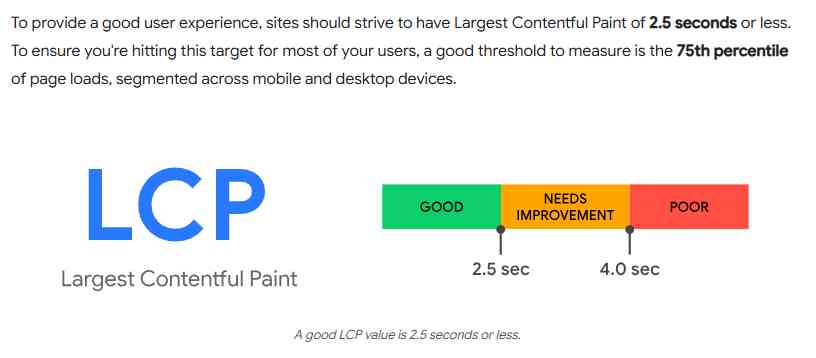
These numbers are useful targets, but passing Core Web Vitals alone will not make a page rank. Google considers many signals, including relevance and content quality.
How to Fix
- Check your Core Web Vitals and page performance.
- Compress large images and reduce unnecessary scripts.
- Make sure your pages work properly on mobile devices.
- Find and fix important broken links and 404 errors.
- Review redirects and remove unnecessary redirect chains.
- Check for server errors in Google Search Console.
- Make sure important pages can be crawled and rendered correctly.
How to Check Why Your Website Is Not Ranking
If you are unsure where the problem is, Google Search Console is one of the best places to start. It can help you determine whether your pages are indexed, how they are appearing in search, and whether Google has found technical problems.
1. Check Google Search Console
Open Google Search Console and review the Page indexing report under the Indexing section. Look at the number of indexed and non-indexed pages. The reasons listed under pages that are not indexed can point you toward problems such as server errors, duplicate pages, redirects, or noindex directives.
You should also check the Security & Manual Actions section to make sure there are no manual penalties or security problems affecting the site.
2. Inspect Your URLs and Indexing Status
For a page that is not appearing in Google, enter its URL into the URL Inspection tool. If Search Console says the URL is not on Google, investigate the reason shown in the report. Review the crawl information and make sure Google can access the page.
If the page is eligible for indexing and there are no obvious technical problems, you can request indexing after making necessary changes.
3. Analyze Search Performance
The Performance report can tell you much more than just how many clicks your website receives. It also shows your impressions, click through rate, average position, and the search queries bringing visitors to your site.
Review:
- Total clicks
- Total impressions
- Average CTR
- Average position
Then look at the Queries and Pages sections.
If impressions are high but your average position is far down the results, your page is being seen but is struggling to compete. If impressions are low as well, you may need to review the keyword, search intent, indexing status, or overall visibility.
4. Compare Search Intent and Content With Top-Ranking Pages
Search your main keyword and look at the top three to five results. Pay attention to the type of content Google is showing. Are they detailed guides, comparison pages, product pages, listicles, or something else?
Then compare your page with those results. Look for missing topics, weak explanations, outdated information, poor formatting, or a different content format that does not match what searchers expect.
You do not need to copy the competing pages. The goal is to understand what users are being given and create something more useful.
Why Your Website Is Indexed but Still Not Ranking
Being indexed only means Google has added your page to its index. It does not mean Google considers the page one of the best results for a particular search. A page can be indexed and still rank on page five, page ten, or even lower.
Some common reasons include:
- Strong competition: Other websites may have more relevant content, stronger authority, or a better history in the topic.
- Weak search intent match: Your page may be about the right general topic but not answer the actual question behind the search.
- Limited content quality: The page may not provide enough useful information or original value.
- Weak site structure: Important pages may have few internal links or be difficult to reach.
- Limited authority: Your website may not yet have enough relevant external references to compete for difficult queries.
- Technical or user experience problems: Slow loading, mobile problems, or other issues can make the page less useful.
Also, be careful with the idea of a formal "Google Sandbox." Google has not publicly confirmed a specific sandbox system that automatically suppresses all new websites for a fixed period. New websites can still take time to build visibility because they have less history, content, and authority.
How Long Does It Take for a Website to Rank on Google?
There is no guaranteed timeline for Google rankings. Some pages can start appearing for less competitive searches within weeks. For a newer website targeting competitive keywords, meaningful first-page visibility can take several months or longer.
A practical SEO timeline is usually measured in months rather than days. Technical fixes may begin showing changes sooner, while building content depth, relevant backlinks, and overall authority can take considerably longer. The exact timeline depends on the website, competition, the scale of the changes, and how quickly Google recrawls and reevaluates the affected pages.
For this reason, estimates such as 2 to 24 weeks for technical improvements or 6 to 12 months for authority building should be treated as working industry ranges, not guarantees from Google.
|
Factor |
Faster Progress |
Slower Progress |
|
Keyword competition |
Specific long-tail searches |
Broad, high-volume keywords |
|
Website history |
Established site with a clean history |
Brand-new domain |
|
Content |
Original, useful, intent-focused content |
Thin, generic, or outdated content |
|
Backlinks |
Relevant, natural links |
Few or no quality external links |
|
Site structure |
Clear navigation and strong internal links |
Orphan pages and poor architecture |
Instead of asking only how long it will take, look at whether your website is improving over time. More impressions, better average positions, and increasing clicks are signs that your SEO work is moving in the right direction.
What to Do If Your Google Rankings Suddenly Drop
A sudden ranking drop can be stressful, but avoid making major changes before you understand what happened. First, find out whether the decline affects the whole website or only specific pages and queries.
1. Check for Algorithm Updates
Look at Google's Search Status Dashboard to see whether a major search ranking update is taking place. You can also compare your traffic and ranking data with reputable SEO volatility trackers. If many websites are experiencing changes at the same time, an algorithm update may be part of the explanation.
Do not automatically assume an update means your website has been penalized. Rankings can move for many reasons, including changes in competitors and changes in search results.
2. Review Recent Website Changes
Think about what changed shortly before the rankings dropped.
Check recent:
- Website redesigns
- URL changes
- Plugin updates
- Content removals
- Template changes
- Internal linking changes
- CMS or developer changes
A URL structure change without proper redirects, for example, can cause significant problems for pages that previously received search traffic.
3. Check Technical and Indexing Issues
Open Google Search Console and review the Page indexing and Security & Manual Actions reports.
Look for sudden increases in:
- 5xx server errors
- 404 errors
- Redirect errors
- Pages marked as not indexed
- Security problems
- Manual actions
You can also inspect some of your most important URLs individually to make sure Google can still access and render them.
4. Compare Google Search Console Data
Use the Performance report to compare the period before and after the drop. Start with the Pages report to identify which URLs lost clicks or impressions. Then check the Queries report to see whether the decline affects many search terms or only a few. A sitewide decline points toward a different problem than a drop affecting only two or three pages.
Google Ranking Troubleshooting Checklist
Use this checklist before making major SEO changes.
Phase 1: Technical and Indexing Health
- Check the affected URL in Google Search Console.
- Confirm whether the URL is indexed.
- Check for noindex directives.
- Review your robots.txt file.
- Check for server, redirect, and 404 errors.
- Review Security & Manual Actions.
Phase 2: Performance and Data
- Compare recent clicks and impressions with an earlier period.
- Check which pages lost the most visibility.
- Review the queries that lost rankings.
- Check average position and CTR.
- Look for ranking changes that coincide with a confirmed Google update.
Phase 3: Content and Search Intent
- Search your primary keyword and review the top results.
- Check whether your content format matches the search intent.
- Make sure the page answers the main question clearly.
- Update outdated information.
- Add original examples, research, or useful details where needed.
- Review title tags and headings.
Phase 4: Authority and Site Structure
- Check whether important pages have internal links.
- Remove or improve orphan pages.
- Use descriptive anchor text.
- Review your backlink profile.
- Create content that other relevant websites have a reason to reference.
- Target more specific keywords if your website is still building authority.
Working through these areas in order can save you from spending hours changing things that were never causing the problem in the first place.
Conclusion
If your website is not ranking on Google, first check whether Google can crawl and index your pages. Then review search intent, content quality, keyword competition, internal links, backlinks, on-page SEO, and technical issues. Some fixes can show results quickly, while building authority and competing for difficult keywords can take months. Use Google Search Console to identify what is actually affecting your visibility, fix the specific problems, and give Google time to recrawl your pages. Consistent, useful SEO work is more effective than trying to find one quick fix.
Frequently Asked Questions
1. Why is my website not ranking for my brand name?
Your website may not be indexed properly, or Google may not yet recognize it as the main result for your brand. Check indexing in Google Search Console.
2. Why is my website traffic dropping but rankings look normal?
Traffic can drop because search demand, impressions, or click through rates have changed. Check your Google Search Console performance data.
3. Does website speed affect Google rankings?
Yes. Website speed and Core Web Vitals can affect page experience and may influence rankings, especially when other ranking factors are similar.
4. Does changing my website design affect SEO rankings?
Yes. Design changes can affect URLs, internal links, content, speed, and indexing. Check these areas after a redesign.
5. Can poor mobile optimization affect my Google rankings?
Yes. Google uses mobile first indexing, so your website should work properly and provide a good experience on mobile devices.
People are also reading: