
The structure of a website is very important. It must be user-friendly and appealing. Impressive designs and engaging content can attract plenty of users to your sites. Many users of them are your potential customers. Therefore, it is vital to have a fully optimized and easy-to-navigate website.
Here are some of the most interesting web design statistics for you:
- 59% of users prefer to browse well-designed and appealing sites to basic ones.
- 39% of users are attracted to color more than any other element while navigating your website.
- Mobile users do not wait for a site to load for more than three seconds.
This post answers your question: What is web designing in detail? There is a lot to know, so let’s begin!
What is Web Designing?
Web designing or website designing is creating websites and different web pages for a brand. It tells the users about your company and the information associated with it.
The two most important factors in web design are appearance and design. These two elements instantly catch users' attention and prompt them to spend more time on your site.
However, web design has other important elements, such as layout, images, readability, color scheme, etc. All these elements determine the final look of a website and its compatibility on different devices.
Adaptive vs Responsive Web Design
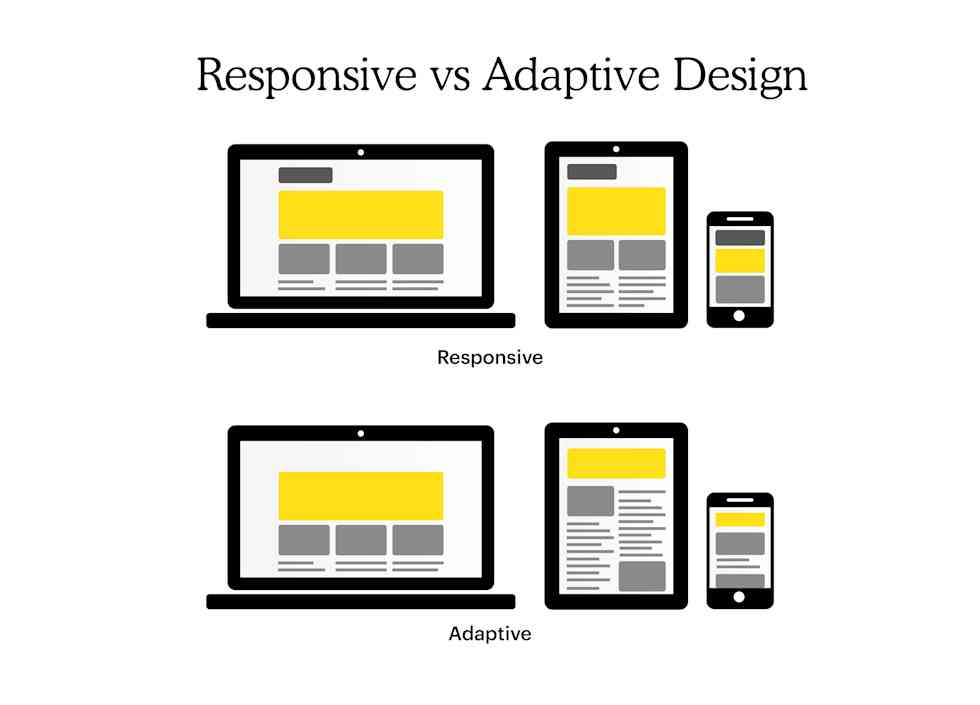
When you want to create your website, first consider whether you want an adaptive or a responsive website. This choice helps determine the right website builder to use. Many technologies are available for website design. But amongst that grand schema of things, there are only two styles of website. What are the differences between those two website styles?
Adaptive Website
Adaptive websites have two or more versions. These versions can be customized for certain screen sizes. They have two categories based on the way the site detects them:
- Device type: The browser requests the “user-agent” field after connecting your website.This field helps the server understand the type of device used to view the page. Adaptive websites understand the version to display. If the browser is shrunk to house additional windows, then the users could potentially run into issues. This is because the user agent will still recognize the desktop as the original device.
- Browser width: In a browser, the website doesn’t use the user agent, but the media queries that use pixel widths, not versions, based on the device. This provides a more flexible and better experience for the users.
Responsive Websites
Responsive websites use the flexibility of grid layouts. These layouts are based on the percentages of each element in the container. Responsive websites include elements that will be of certain percentages. The screen size doesn’t affect these elements. These websites are valuable as they change constantly based on the used screen size.
Key Point:
Some web builders contain both types of website features, adaptive and responsive. These builders are better for use as they can make the website adaptive as well as responsive at the same time.
Web Design vs Web Development
Web design and web development are the two different terms that you may get confused in. They both are two very different things having different purposes and requiring different skill sets.
Web design is about the experiential side of a website. It helps make sure that your website is useful, immersive, and engaging. It depends on the expectations of the users. Web design uses this knowledge of user’s expectations to ensure an excellent user experience.
On the other hand, web development is about the building and maintenance of a website. It is done using the coding systems. This helps ensure the smooth functioning of the website without any glitches.
Why is Web Design Important?
If you have an appealing and user-friendly website, the chances of more visitors to your site increase tremendously.
According to statistics, a user takes approximately 0.05 seconds to form an opinion about your site. So, strategize in the right way and hold your users!
A good web design indicates a lot about your brand, such as:
- Brand authenticity
- Reliability
- Trustworthiness
Therefore, work on creating a website that bonds with the users instantly and gives them the accurate information they want!
What is the use of Web Designing?
Web designing has immense features for a business. Take a look:
- Sets the first impression: First impressions are extremely important. They decide whether the user will come back to your site or not. Therefore, an appealing and impressive web design can fetch more customers.
- Builds trust with the audience: Every piece of information and data on a website builds a connection with the audience. This nexus results in developing trust with them, which further helps enhance your business's credibility.
- Customer satisfaction: Customer is the king. Hence, it is important to satisfy their needs. With an appealing and impressive web design, you can guarantee customer satisfaction.
- Consistent branding: Regular updates and new posts on the website result in consistency. This is crucial for the brand’s growth.
- Improve in sales: The more customers, the more sales will be. This is what every business aspires for. So, with an impressive web design, you can attract more customers to purchase your products.
- More conversion rates: Your conversion rates increase once a user transforms into a customer. The higher the conversion rate, the more the profit!
- SEO: Search Engine Optimization improves your chances of ranking higher on search engines. This will further boost your business as your site's link is displayed in the top search results.
What Does a Good Web Design Look Like?
A good web design does not look complicated and leaves the user confused. However, there is no protocol for good web design that one must follow. But a few important factors must be considered when designing.
An excellent website design is directly related to the number of users you convert regularly. Conversion simply means transforming your users into customers. Your website can prompt users for a purchase or a signup, which is known as converting a user.
Further, here are some effective factors to create an appealing web design:
- Clear representation of content, images, and CTAs.
- Responsive and fully optimized design.
- Appropriate font size (not too small, not too large).
- High-quality images.
- Attractive content.
- Balance texts and images.
An effective design helps your business boost. Therefore, understand your target audience and their style to resonate with them.
What Does a Web Designer Do?
A web designer is a crucial position in a business firm. They are responsible for building the layout and design of the brand’s website.
A website designer is an expert in user interface and designs a user-friendly and appealing site. Their work reflects the image of a brand. Therefore, web designers bear a huge responsibility on their shoulders.
In addition, as per statistics, approximately 50% of internet users say that design is important while forming an opinion of a brand.
A web designer's core responsibilities and tasks are:
- Designing layouts of the websites.
- Creating sample pages and mockups.
- Working on website updates.
- Coordinating with designers and writers.
- Expertise in various designing tools, such as Adobe, to create visuals or animations.
- Providing optimal user experience.
- Registering web domains.
Skills of a web designer
If you wish to become a web designer, recruiters seek specific skills in you. Here we mention some of the most important skills needed for website designing.
1. Communicative skills
A designer must be cordial with the team members, such as a writer, web developer, and other designers, etc. You must be able to listen, understand, and collaborate with other team members and take constructive criticism.
Site creation is the core responsibility of a web designer and the whole team.
Therefore, good communication skills will give the web designer an edge.
2. Time management
Web designers must manage their time efficiently. There are certain deadlines to conquer and handle pressure at work. Therefore, an individual looking for the job role of a web designer must excel in time management.
3. Expertise in design programs
Website designers must hold expertise in different design programs such as Adobe Creative Cloud, Inkscape, CorelDRAW Graphics Suite, etc. These tools help designers create effective visual elements, mock-ups, and appealing images for the website.
4. Knowledge of UX
User experience is an important aspect of web design. UX is essential as it indicates a user's overall experience on your site. To provide an excellent user experience, a designer must research and understand the users' needs.
Check out: Difference Between UI, UX, and Web Designer
5. Coding Languages
It’s not mandatory for a designer to have knowledge of coding languages. However, basic knowledge of HTML and CSS can go a long way! Knowing these programming languages will make modifying templates and fonts or adjusting other web page elements easier.
Elements of a Web Design
A web design comprises various elements that form a fully-functional website. Here are some essential elements:
1. Layout
The website layout is the skeleton of a site. It is the base on which a designer works and creates different web pages. It is an important task for a web designer to choose an appropriate layout for the website. A layout must be simple, interactive, and easy to access for the user.
People currently access websites from devices such as laptops, desktops, tablets, and mobiles. Therefore, it is crucial to create specialized layouts for all these devices. Moreover, Mobile optimization is extremely important, as 80% of users access apps or sites on their phones. So, it is the task of a web designer to create an optimized website compatible with multiple devices.
2. Images
The visual appearance of a website makes a huge difference. The more appealing and highly qualitative images, the more visitors to the website. Therefore, a web designer must incorporate high-quality images, illustrations, graphics, or animations. In addition, it is the designer's responsibility to balance the brand’s images and text with each other.
3. Color Scheme
The combination of a few colors representing your brand defines the color scheme. It is highly effective and a proven factor in attracting a large audience to your site. So, it is advised to work diligently on creating a color palette for the brand and working with it.
Designers must also search for the colors that resonate most with the users and focus on creating a modern website design.
4. Readability
A web page must have easy-to-see and read content that does not confuse users. Any website with complicated text or fonts will increase the bounce rate. This is the last thing a business wants!
Therefore, try incorporating an appropriate size and pixel for your text with readable fonts. Further, the colors of the font also play a vital role in readability. So, work smartly on that!
5. Content
Each and every piece of information or data available on the website is known as content. It holds the highest value. The reason is that it is a medium for your brand to communicate with the users.
An effective copy can quickly grab the eyes of the user, whereas a complicated one loses the customer’s attention. So make sure the tone of your content is catchy and informative.
6. Good Navigation
The navigation on the website should be easy for the user to understand. Otherwise, the customer will simply leave the website and never visit again. The navigational elements help users jump to different web pages of your site. For instance, you must have seen various links in the footer of a website, such as about us, contact us, blogs, etc.
These links help users access other website pages and get the required information.
Therefore, a web designer must be thoughtful and attentive while choosing navigation designs and layouts.
Design Principles Applied to Websites
Various principles of design help designers achieve good web design. These principles help a site to look harmonious and user-friendly. Thus, it attracts a large number of visitors.
Consider these as guidelines to apply while designing a website. Here is a list:
1. Balance
All design elements must not overpower each other. This would gradually lose the interest of the viewer and confuse them. You can create an imaginary line in the middle of a design and use these two ways to achieve balance:
- Symmetrical balance: this creates consistency in the design and provides visual weight on both sides of the line. It results in clean and arranged visuals (mirror image).
- Asymmetrical balance: it’s a modern approach that creates dynamic designs and maintains a harmonious composition overall (not a mirror image).
2. Emphasis
If there is something that you want the user to emphasize, such as a logo image or a CTA, then you can apply this principle of emphasis. Use bright colors, create variations in size, or animate the element to grab the user's attention.
3. Contrast
It is important to play with contrast to add a bit of extra drama and eye-catching qualities to the design. Designers can focus on highlighting the elements in a design by creating dark and light, large and small, or such variations.
A contrast stops the customer and captivates their attention.
4. Rhythm
To focus or deliver a certain message, designers should focus on rhythm. Rhythm is the repetition of elements in a design to create consistency.
It also creates a strong web presence for your brand by repeating the characteristics, such as brand colors or logos.
5. Whitespace
Any void area in a design is referred to as white space. By creating a white space, other elements can breathe and have the viewer's attention.
6. Movement
This principle is important in holding the user on your website. Movement guides the users from one element to another on the site. You can control the size, direction, or order of different elements of web pages to retain the viewer for a longer time on the site.
Tips for Designing an Effective Website
An effective web design has no protocols. However, some tips can create an eye-catching and aesthetic design for your website.
1. Mobile Optimization
According to statistics, approximately 80% of users access websites and applications from their mobile phones.
As you can see, a large number of people across the globe pick up their phones to browse a site. Therefore, you must optimize your site for different devices, especially mobiles. Designers can start designing the UI layout for mobile screens and then move to the desktop website experience.
2. Balance Whitespace
White space is also known as negative space. A good design has different elements that also have space to breathe. Designers must not overcomplicate or create congested designs. Moreover, it’s not necessary to fill space with graphics and information. Instead, use the negative space in a design as it creates a better, cleaner, and more appealing design.
3. High-Quality Images
Web designers are highly recommended to avoid blurry images on the website. This instantly prompts the user to leave the website. Moreover, good-quality images reflect the authenticity of a brand. So, using graphics with the right size and scaling is vital.
Every designing tool, such as Adobe Photoshop, has features to adjust the pixels of an image accordingly. So, use those adjustments to avoid adding bad-quality images.
4. Use Grids
Implementing the use of grids while designing helps to better organize the content of a webpage. If you are not using grids, it may lead to the misalignment of elements, which results in a bad navigation experience for the users.
Web designers can opt for the 960 Grid System in their designs. There are two variations, namely, 12 and 16 columns.
5. Hierarchy
Hierarchy in a website is extremely important. It guides the user to understand the most important element of the website. For instance, if you keep the font size and style of the CTA button the same as that of the normal text on the landing page, it might not attract a user's attention. But creating a bold CTA button with bright colors will instantly grab the user's attention.
Therefore, hierarchy is a great concept and directs the user to the most important information on your website, and then reads the latter part.
In addition to the above tips and principles, you can also refer to the creative web design trends to develop appealing websites.
Conclusion
Now that you have a decent idea of what web design is, it will be easy and comfortable for you to create appealing designs for your website. Or in other cases, understand what to look for in a web designer while recruiting one.
Web design is an important aspect of a website as it’s an excellent way to tell about your brand to the customers. I hope the tools and techniques mentioned above will help you understand what web designing is!
In case of any queries, feel free to drop a comment below!
Adios!
People are also reading:
- Best Productivity Apps
- Agile Project Management Tools
- Web Development Technologies
- Quillbot vs Grammarly
- Content Marketing Tools
- Content Marketing Platforms
- Native vs Hybrid Apps
- Best Startup Ideas
- Software Testing Strategies
- Web Development Frameworks
Frequently Asked Questions
1. Is web design easy to learn?
Web design is very easy to learn. There are many online as well as offline courses available for the same.
2. What are the duties of a web designer?
A web designer must have good communication skills, UX knowledge, basic coding skills, time management skills, and the ability to work under pressure.
3. Should I opt for web designing as a career?
Yes, web designing is an excellent career path. There are ample opportunities that offer lucrative packages and a stable career.
4. Can I learn web design myself?
Yes. Many online courses are available on YouTube or offered by various e-learning platforms such as Udemy, Coursera, Skillshare, etc. You can avail yourself of paid as well as free courses.
5. What skills do I need to develop to become a web designer?
A web designer must communicate well, have UX expertise, great teamwork skills, and basic coding capabilities.