
A headless CMS is a content management system that separates content management from the frontend that displays the content. It allows businesses to create, organize, and manage content in one place and deliver it through APIs to websites, mobile apps, ecommerce stores, and other digital experiences.
Unlike a traditional CMS, a headless CMS does not require the content and presentation layer to work as one system. Developers can build the frontend separately using the technology that best fits the project, while content teams can continue managing content through the CMS.
This approach has become more relevant as businesses publish content across multiple channels. According to Grand View Research, the global headless CMS software market was valued at $1.8 billion in 2025 and is projected to reach $6.2 billion by 2033, representing a 17.5% CAGR from 2026 to 2033.
What Is a Headless CMS?
A headless CMS is a content management system that separates the backend content repository from the frontend presentation layer. The CMS is responsible for creating, storing, organizing, and managing content, while a separate frontend determines how that content appears to users.
The term “headless” refers to removing the “head,” which means the presentation layer. In a traditional CMS, content management and presentation are usually closely connected. You create content, select a theme or template, and the CMS generates the website pages using that system. With a headless CMS, the content is delivered through an API, allowing a separate frontend to control the design and user experience.
For example, an ecommerce company could store product names, descriptions, images, specifications, and other information in a headless CMS. Its website can request that information through an API and display it as a product page, while its mobile app can use the same content in a completely different interface. The content remains centralized, but each platform can present it in its own way.
This separation is the main reason businesses choose a headless CMS. It gives developers more freedom over the frontend while allowing content teams to manage reusable content from a central system.
How Does a Headless CMS Work?
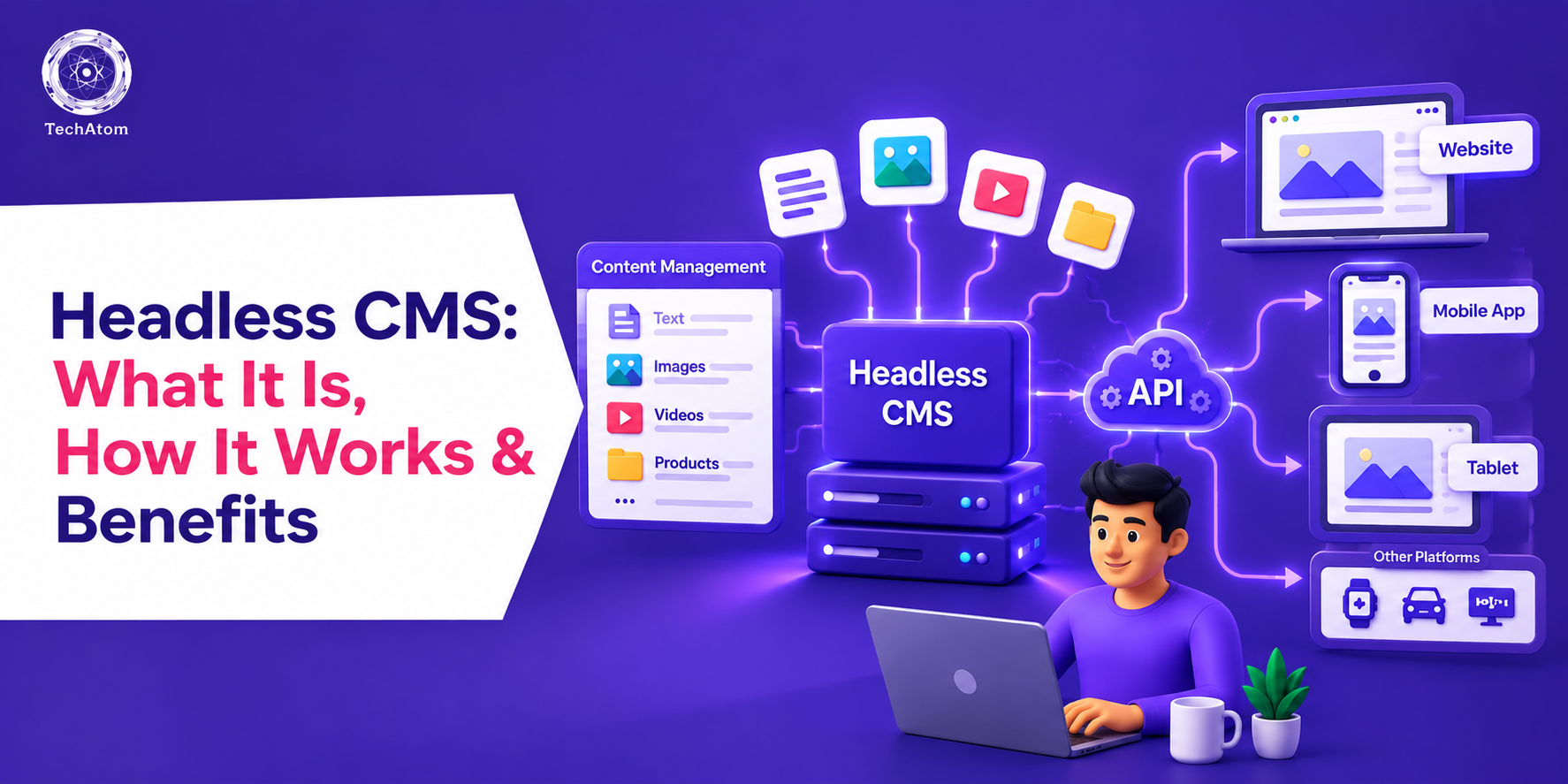
A headless CMS separates content management from presentation. Content teams create and organize structured content such as titles, descriptions, images, authors, categories, and product details inside the CMS. The CMS stores this content and makes it available through an API.
When a website or app needs the content, its frontend requests the required data from the API. The CMS returns the content, while the frontend decides how it should look and function for users.
For example, a news website can store an article once and deliver the same headline, text, image, and author information to both its website and mobile app. The exact setup varies by platform, with some headless CMSs using REST APIs and others supporting GraphQL. The basic idea is simple: the CMS manages the content, while the frontend manages the presentation.
Headless CMS Architecture
A typical headless CMS architecture has three main layers.
- Content layer: This is where writers, editors, marketers, and other users create and manage content. It includes content models, media, categories, authors, products, and other structured information.
- API layer: The API connects the CMS with the applications that need the content. It allows the frontend to request specific content and receive it in a structured format.
- Presentation layer: This is the website, mobile app, ecommerce frontend, or other digital experience that displays the content. It can be built independently from the CMS.
This architecture gives developers greater control over how content is rendered and delivered. However, it also means the business may have more technical components to build and maintain compared with an all-in-one CMS.
Key Features of a Headless CMS
While features vary by platform, most headless CMS solutions provide some combination of:
- Structured content
- Content modeling
- API-based content delivery
- Media management
- Content workflows
- User roles and permissions
- Localization
- Versioning
- Webhooks
- REST or GraphQL APIs
- Integrations
- Preview capabilities
One important feature is structured content. Instead of treating every page as one large document, a headless CMS can organize information into reusable content fields and components. This makes it easier for different applications to use the same content in different ways.
Benefits of a Headless CMS
Greater Frontend Flexibility
Developers are not restricted to the CMS's themes or templates. They can choose a frontend framework, hosting environment, and development approach that fits the project.
This is particularly useful for businesses building highly customized websites or web applications where a traditional CMS may impose limitations.
Content Reuse
A headless CMS can provide a central source for content that needs to appear in multiple places. Teams can create content once and make it available to different frontends through APIs.
This can reduce the need to maintain separate copies of the same information across different platforms.
Multi-Channel Content Delivery
Modern businesses may publish content across websites, mobile applications, ecommerce experiences, customer portals, and other channels.
A headless CMS can support these use cases because the content is not tied to one specific frontend.
Greater Development Control
Developers have more control over the frontend architecture, including how pages are rendered, cached, hosted, and optimized.
This flexibility can be useful for businesses with specific performance, accessibility, design, or application requirements.
Easier Integration
Because content is exposed through APIs, developers can connect the CMS with other systems such as ecommerce platforms, search tools, analytics platforms, personalization systems, and custom applications.
However, integrations still need to be planned and maintained. Using a headless CMS does not automatically make every integration simple.
Disadvantages of a Headless CMS
More Development Work
A headless CMS does not normally provide the complete website frontend. Developers have to build and maintain the presentation layer separately.
For a simple website, this can create more work than necessary.
Higher Technical Requirements
Teams need developers who understand APIs, frontend development, hosting, deployment, and related technologies. Content teams may also need time to adapt to the CMS's editing workflow.
More Components to Maintain
A headless project can involve the CMS, frontend application, APIs, hosting, integrations, and deployment systems. Each component can introduce its own maintenance requirements.
Editorial Experience Can Vary
Traditional CMS platforms often provide familiar visual editing experiences. Headless CMS platforms vary widely in this area. Some offer visual previews and editing tools, while others focus more heavily on structured content management.
Is a Headless CMS Better for SEO?
Not automatically.
A headless CMS can give developers more control over technical SEO, but the architecture itself does not guarantee higher rankings.
SEO depends on how the frontend is built. Factors such as crawlability, page speed, internal linking, metadata, canonical URLs, structured data, mobile usability, content quality, and rendering still matter.
JavaScript is especially important for headless websites. Google Search processes JavaScript through crawling, rendering, and indexing. Google can render JavaScript, but its documentation also notes that there are limitations, and server-side or pre-rendering can be useful because it can make content accessible to crawlers and users more efficiently.
For a headless website, developers should pay attention to:
- Server-side or static rendering where appropriate
- Crawlable internal links
- Correct HTTP status codes
- Unique page titles and descriptions
- Canonical URLs
- XML sitemaps
- Structured data
- Mobile usability
- Page performance
- JavaScript rendering
- Proper redirects and 404 handling
Google specifically recommends server-side rendering, static rendering, or hydration rather than relying on dynamic rendering as a long-term solution.
So, headless CMS can support strong SEO, but SEO performance depends on the implementation.
Does a Headless CMS Improve Website Performance?
A headless CMS does not automatically make a website faster.
Performance depends on factors such as frontend code, hosting, caching, image optimization, JavaScript, API response times, content delivery, and how pages are rendered.
However, separating the frontend from the CMS can give developers more control over these areas. For example, a development team may use static generation, server-side rendering, caching, a CDN, and optimized assets to improve performance.
The advantage is therefore greater control, not an automatic performance improvement.
Is a Headless CMS More Secure?
Headless architecture should not be described as automatically more secure either.
Separating the CMS from the public-facing frontend can change the attack surface, but a headless project also relies heavily on APIs, authentication, permissions, integrations, and infrastructure.
Security depends on how these components are configured and maintained.
Important areas include:
- API authentication
- Access controls
- User permissions
- Secure credentials
- Input validation
- Rate limiting
- Regular updates
- Monitoring and logging
- Secure hosting
A well-designed headless architecture can have a strong security setup, but the architecture alone does not guarantee security.
Headless CMS and AI
AI is another area where structured content can be useful.
A headless CMS stores content in structured formats and makes it available through APIs. This can make it easier for applications and AI-powered workflows to access specific content instead of working with information that is tightly connected to a particular webpage layout.
For example, a business could use its structured product information with a website search system, recommendation engine, chatbot, or another AI-powered application.
However, headless CMS is not a requirement for using AI. Traditional CMS platforms can also be connected to AI tools.
The growing interest in AI is nevertheless influencing CMS requirements. Storyblok's 2025 State of CMS survey, based on more than 1,300 CMS users, found that 44% of respondents wanted CMS providers to do more around AI-powered content creation. The same research reported that 61% of teams were using two or more CMSs. Because this is vendor-sponsored research, these figures are better treated as an industry signal rather than a universal benchmark.
Headless CMS Statistics and Market Trends
The headless CMS market is growing as organizations look for more flexible ways to manage content across digital channels.
Grand View Research estimates that the global headless CMS software market was worth $1.8 billion in 2025 and is expected to reach $2.0 billion in 2026. It projects the market to reach $6.2 billion by 2033, representing a 17.5% CAGR between 2026 and 2033.
The same report identifies retail and ecommerce as the largest end-use segment in 2025, while North America accounted for the largest regional share at 36.9%. Cloud deployment also represented the largest deployment segment.
These numbers indicate growing demand for flexible content architectures, but they should not be interpreted as evidence that every organization needs to adopt a headless CMS.
Popular Headless CMS Platforms
There are several headless CMS platforms available, and they target different types of teams and projects.
- Contentful: is a cloud-based content platform designed around structured content and API-driven delivery. It is commonly considered by businesses that need content across multiple digital experiences.
- Sanity: focuses on structured content and a customizable editing experience. It is suited to teams that want significant control over content models and development workflows.
- Strapi: is an open-source headless CMS that provides APIs for delivering structured content. Its flexibility makes it an option for development teams that want greater control over hosting and customization.
- Storyblok: combines headless content management with visual editing features, making it useful for teams that want API-based delivery while still providing editors with a more visual workflow.
- Hygraph: uses a GraphQL-based approach to content delivery and is designed for structured content and multi-channel applications.
The right platform depends on the project's content model, API requirements, editorial workflow, integrations, technical skills, hosting preferences, and budget.
Headless CMS vs Traditional CMS

The main difference between a headless and traditional CMS is how the content and presentation layers are connected.
A traditional CMS generally provides both content management and presentation capabilities. WordPress, for example, is commonly used as a traditional CMS where content is managed through the backend and displayed using a theme or template.
A headless CMS focuses primarily on content management and delivery. The frontend is built separately and retrieves content through APIs.
|
Feature |
Traditional CMS |
Headless CMS |
|
Architecture |
Content and presentation are connected |
Content and presentation are separated |
|
Frontend |
Usually controlled by themes or templates |
Built separately |
|
Content delivery |
Primarily designed around the CMS frontend |
API-based |
|
Flexibility |
Depends on the CMS ecosystem |
Greater frontend freedom |
|
Multiple channels |
May require additional configuration |
Designed for multi-channel delivery |
|
Development |
Often simpler |
Usually requires more development |
|
Content reuse |
Can be more tied to templates |
Structured for reuse |
|
SEO |
Many tools may be built in |
Depends heavily on frontend implementation |
|
Editorial experience |
Often familiar and visual |
Varies by platform |
|
Complexity |
Generally lower |
Generally higher |
A traditional CMS can be the more practical choice for a small business website or blog where simplicity is important. A headless CMS becomes more useful when an organization needs multiple digital experiences, a custom frontend, or greater control over how content is delivered.
Headless CMS vs Decoupled CMS
Headless and decoupled CMSs are often discussed together, but there is a difference.
A decoupled CMS separates the backend from the frontend, but it may still have a specific presentation system or frontend relationship. A headless CMS goes further by removing the built-in presentation layer and delivering content primarily through APIs.
In simple terms, a decoupled CMS separates the systems, while a headless CMS does not require the CMS to control the presentation at all.
The distinction can become less obvious in real-world products because CMS platforms offer different levels of flexibility. The important thing is to look at how content is delivered and how much control the platform gives you over the frontend.
Who Should Use a Headless CMS?
A headless CMS is generally more suitable for organizations that need flexibility, structured content, and multi-channel content delivery.
E-commerce Websites

E-commerce websites need flexibility to deliver product and marketing content across websites, mobile apps, and other digital channels. A headless CMS can help businesses manage this content centrally while giving developers greater control over each frontend.
For example, PUMA adopted a headless content architecture with Sanity to support its global ecommerce experiences across websites and mobile apps. The setup provides a centralized content system that can support different markets and digital experiences.
Retail and ecommerce were identified as the largest end-use segment in Grand View Research's headless CMS market analysis.
Media and Publishing

Publishers can use structured content to manage articles, authors, categories, images, videos, and other information across websites and applications.
Large Enterprises
Organizations managing multiple websites, brands, regions, or digital products may benefit from a centralized content layer that can support different frontends.
Businesses With Multiple Digital Products
Companies with websites, mobile applications, customer portals, or other digital products can use a headless CMS when the same content needs to be shared across different digital experiences.
When Should You Not Use a Headless CMS?
A headless CMS is not the right choice for every website. A traditional CMS may be more practical for a small business website, personal blog, portfolio, or simple marketing site where easy content management is the main priority.
It may also be unnecessary for businesses with a small development team that do not need multiple frontends or highly customized digital experiences. Headless architecture offers greater flexibility, but it also requires more development and maintenance.
If those additional capabilities do not solve a specific business need, a traditional CMS may provide better value with less complexity.
How to Choose a Headless CMS
Choosing a headless CMS should involve more than comparing feature lists.
- Start with the content model: Make sure the platform can represent the types of content your business actually manages, including relationships, categories, media, localization, and reusable components.
- Evaluate the API: Check API documentation, authentication, query capabilities, rate limits, webhooks, and developer experience. The API is central to a headless architecture, so it should be reliable and easy for your development team to work with.
- Test the editorial experience: Content teams should be able to create, edit, organize, preview, approve, and publish content without unnecessary friction.
- Check integrations: Make sure the CMS works with the ecommerce platform, search tools, analytics systems, authentication providers, and other important parts of your technology stack.
- Consider total cost: Look beyond the CMS subscription. Development, hosting, frontend infrastructure, API usage, migration, maintenance, and support can all contribute to the overall cost.
Conclusion
A headless CMS separates content management from the frontend, allowing businesses to manage structured content centrally and deliver it across websites, apps, and other digital channels. It offers greater flexibility and content reuse, but also requires more development and maintenance.
For businesses with multiple digital experiences or customized frontend needs, a headless CMS can be a strong choice. For smaller websites that prioritize simplicity, a traditional CMS may offer better value.
Frequently Asked Questions
1. Can a headless CMS be used with WordPress?
Yes. WordPress can be used as a headless CMS by using its APIs to deliver content to a separately developed frontend. WordPress itself is traditionally a monolithic CMS.
2. Does a headless CMS improve website speed?
Not automatically. A headless CMS gives developers more control over the frontend, but website speed depends on factors such as rendering, hosting, caching, JavaScript, images, and API performance.
3. Is a headless CMS more secure than a traditional CMS?
Not necessarily. Separating the frontend from the CMS can change the security architecture, but APIs, authentication, access controls, dependencies, and infrastructure still need to be properly secured.
4. Can a headless CMS be used for mobile apps?
Yes. A headless CMS can deliver the same structured content through APIs to mobile applications, websites, and other digital platforms without requiring each platform to maintain separate content.
5. Is a headless CMS difficult to maintain?
It can require more technical maintenance than a traditional CMS because the frontend, APIs, hosting, integrations, and CMS may need to be managed separately. The complexity depends on the project and technology stack.
6. Is a headless CMS worth it for a small business?
Not always. A traditional CMS may be a better choice for a small website that only needs simple content management and does not require multiple frontends or highly customized digital experiences.
People are also reading:
- E-E-A-T in 2026
- SEO for AI Agents
- SEO for Small Business
- SEO for App Store
- SEO for Fashion Ecommerce
- SEO for Real Estate Lawyers